AI Chat - Simple OpenAI Chat API, UI & LLM Gateway


AI Chat UI
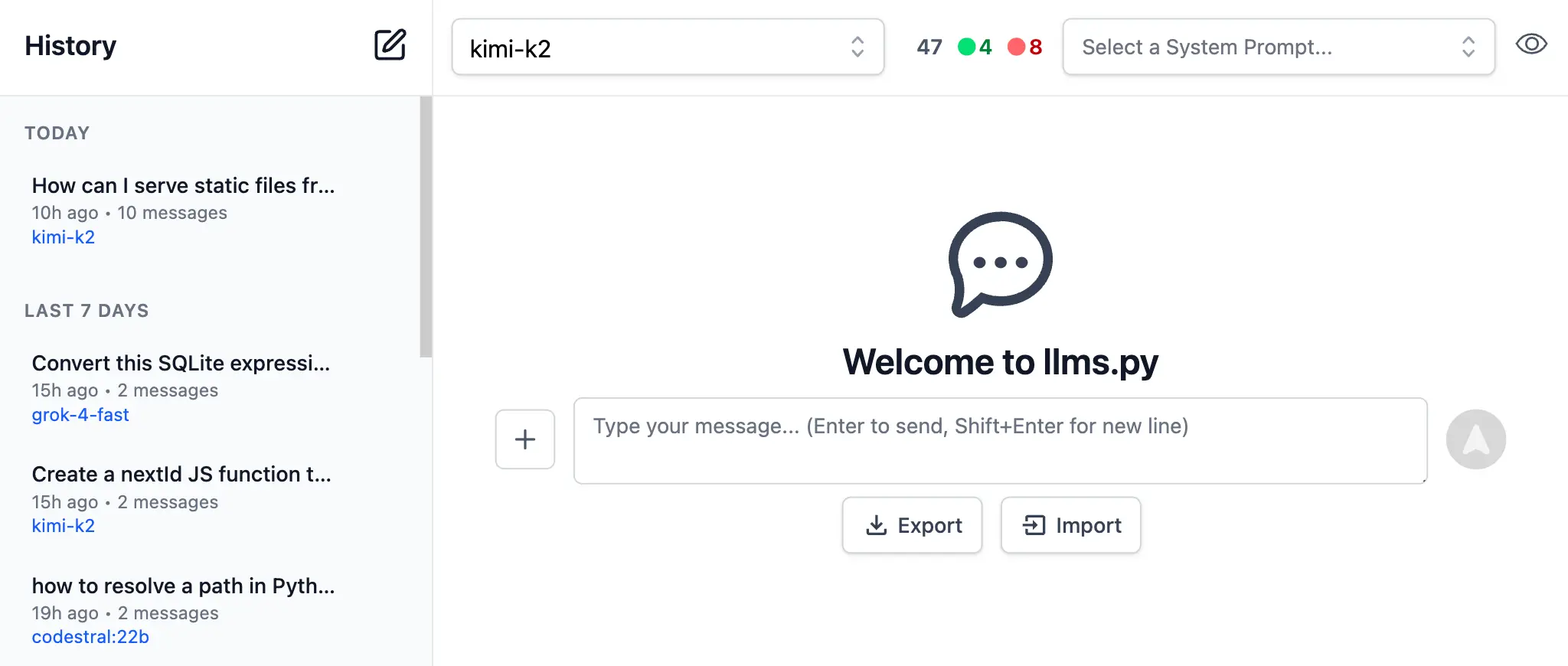
Another major value proposition of AI Chat is being able to offer a ChatGPT-like UI to your users where you're able to control the API Keys, billing, and sanctioned providers your users can access to maintain your own Fast, Local, and Private access to AI from within your own organization.
Install
AI Chat can be added to any .NET 8+ project by installing the ServiceStack.AI.Chat NuGet package and configuration with:
npx add-in chat
Which drops this simple Modular Startup that adds the ChatFeature
and registers a link to its UI on the Metadata Page if you want it:
public class ConfigureAiChat : IHostingStartup
{
    public void Configure(IWebHostBuilder builder) => builder
        .ConfigureServices(services => {
            services.AddPlugin(new ChatFeature());

            services.ConfigurePlugin<MetadataFeature>(feature => {
                feature.AddPluginLink("/chat", "AI Chat");
            });
       });
}
Identity Auth or Valid API Key
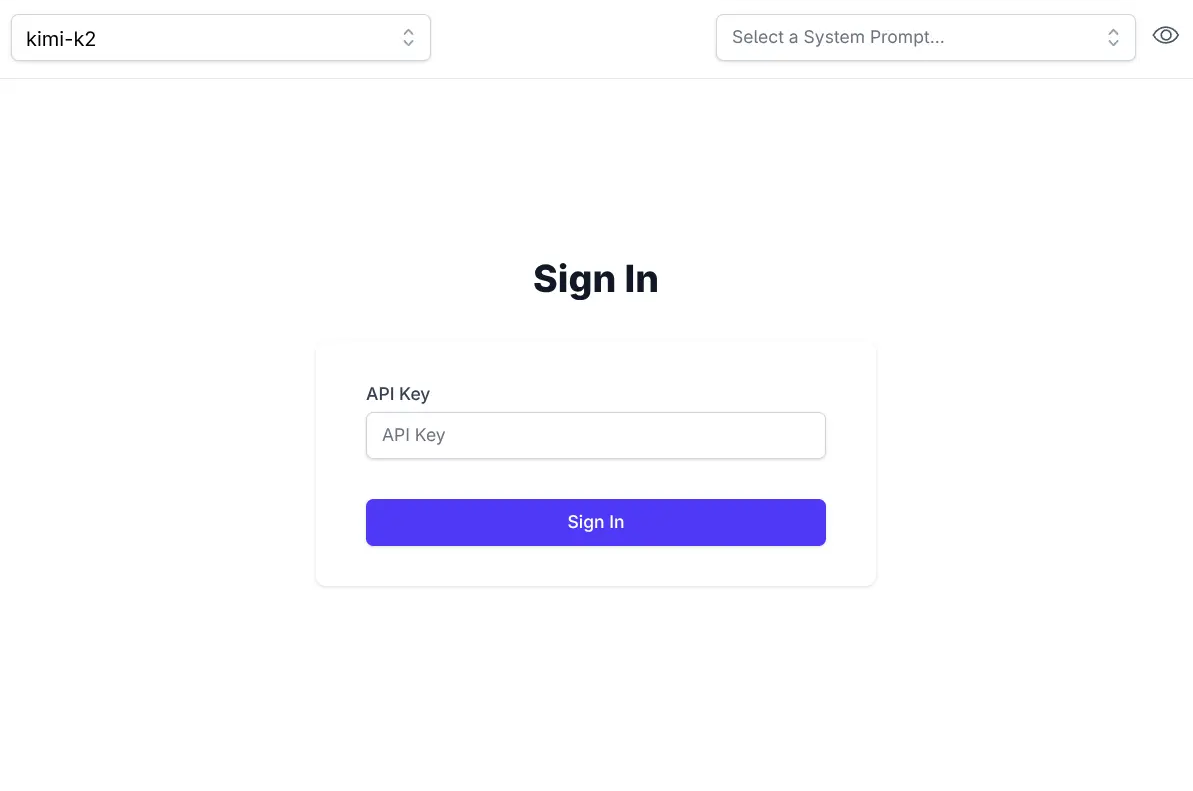
AI Chat makes of ServiceStack's new API Keys or Identity Auth APIs which allows usage for both Authenticated Identity Auth users otherwise unauthenticated users will need to provide a valid API Key:
If needed ValidateRequest can be used to further restrict access to AI Chat's UI and APIs, e.g. you can restrict access
to API Keys with the Admin scope with:
services.AddPlugin(new ChatFeature {
    ValidateRequest = async req =>
        req.GetApiKey()?.HasScope(RoleNames.Admin) == true
            ? null
            : HttpResult.Redirect("/admin-ui"),
});
Import / Export
All data is stored locally in the users local browser's IndexedDB. When needed you can backup and transfer your entire chat history between different browsers using the Export and Import features on the home page.
Simple and Flexible UI
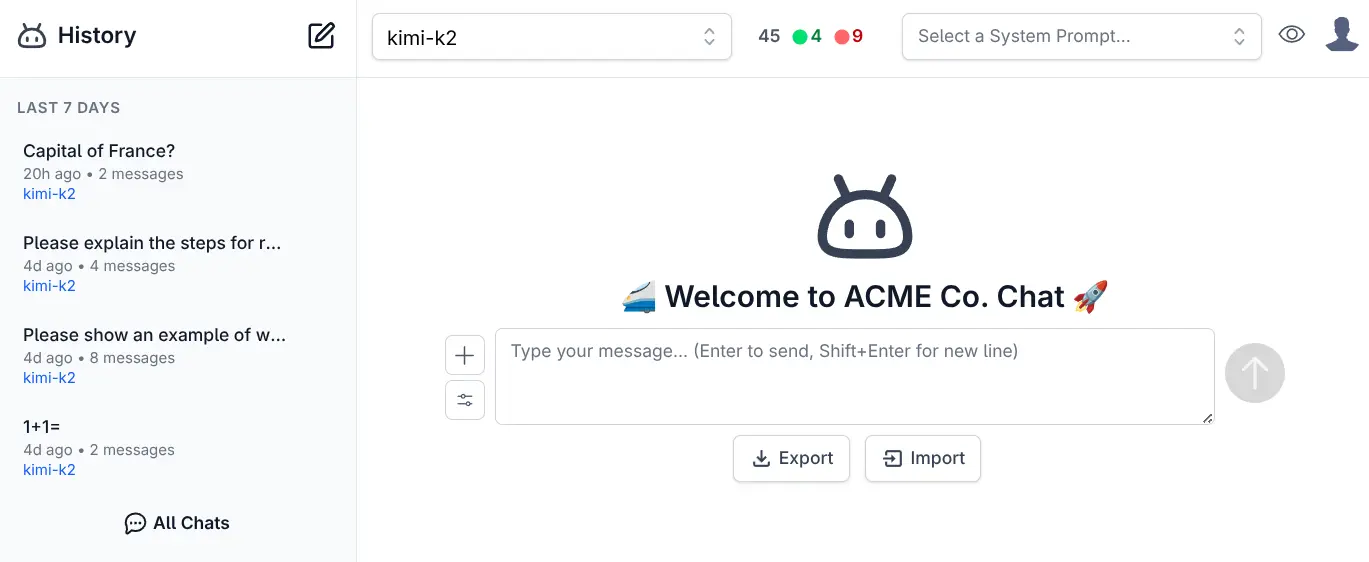
Like all of ServiceStack's built-in UIs, AI Chat is also naturally customizable where you can override any of AI Chat's Vue Components and override them with your own by placing them in your /wwwroot/chat folder:
/wwwroot
  /chat
    Brand.mjs
    Welcome.mjs
Where you'll be able to customize the appearance and behavior of AI Chat's UI to match your App's branding and needs.
Customize
The built-in ui.json configuration can be overridden with your own to use your preferred system prompts and other defaults by adding them to your local folder:
/wwwroot
  /chat
    llms.json
    ui.json
Alternatively ConfigJson and UiConfigJson can be used to load custom JSON configuration from a different source, e.g:
services.AddPlugin(new ChatFeature {
    // Use custom llms.json configuration
    ConfigJson = vfs.GetFile("App_Data/llms.json").ReadAllText(),

    // Use custom ui.json configuration
    UiConfigJson = vfs.GetFile("App_Data/ui.json").ReadAllText(),
});
Rich Markdown & Syntax Highlighting
To maximize readability there's full support for Markdown and Syntax highlighting for the most popular programming languages.
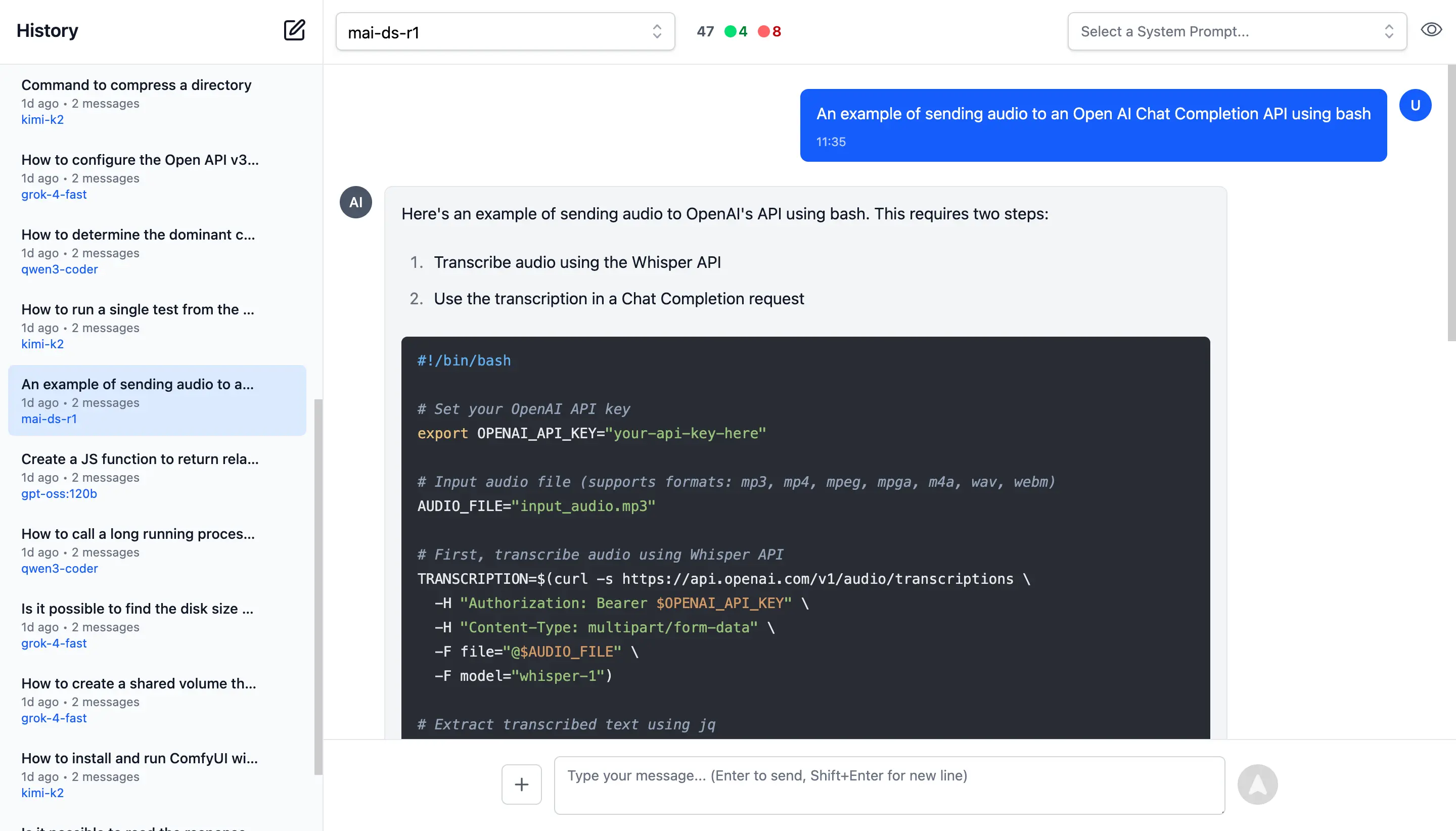
To quickly and easily make use of AI Responses, Copy Code icons are readily available on hover of all messages and code blocks.
Rich, Multimodal Inputs
The Chat UI goes beyond just text and can take advantage of the multimodal capabilities of modern LLMs with support for Image, Audio, and File inputs.
🖼️ 1. Image Inputs & Analysis
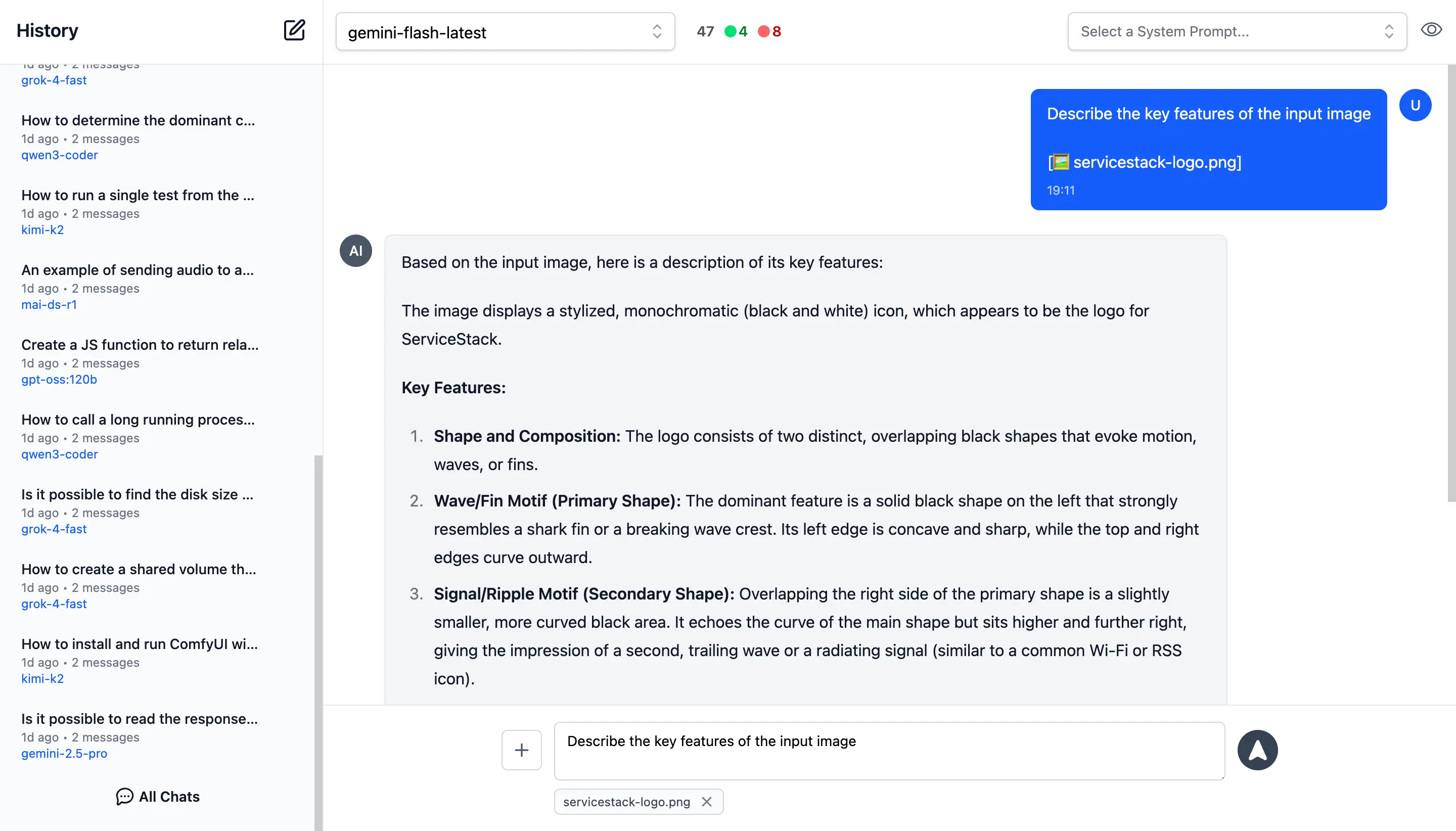
Images can be uploaded directly into your conversations with vision-capable models for comprehensive image analysis.
Visual AI Responses are highly dependent on the model used. This is a typical example of the visual analysis provided by the latest Gemini Flash of our ServiceStack Logo:

🎤 2. Audio Input & Transcription
Likewise you can upload Audio files and have them transcribed and analyzed by multi-modal models with audio capabilities.
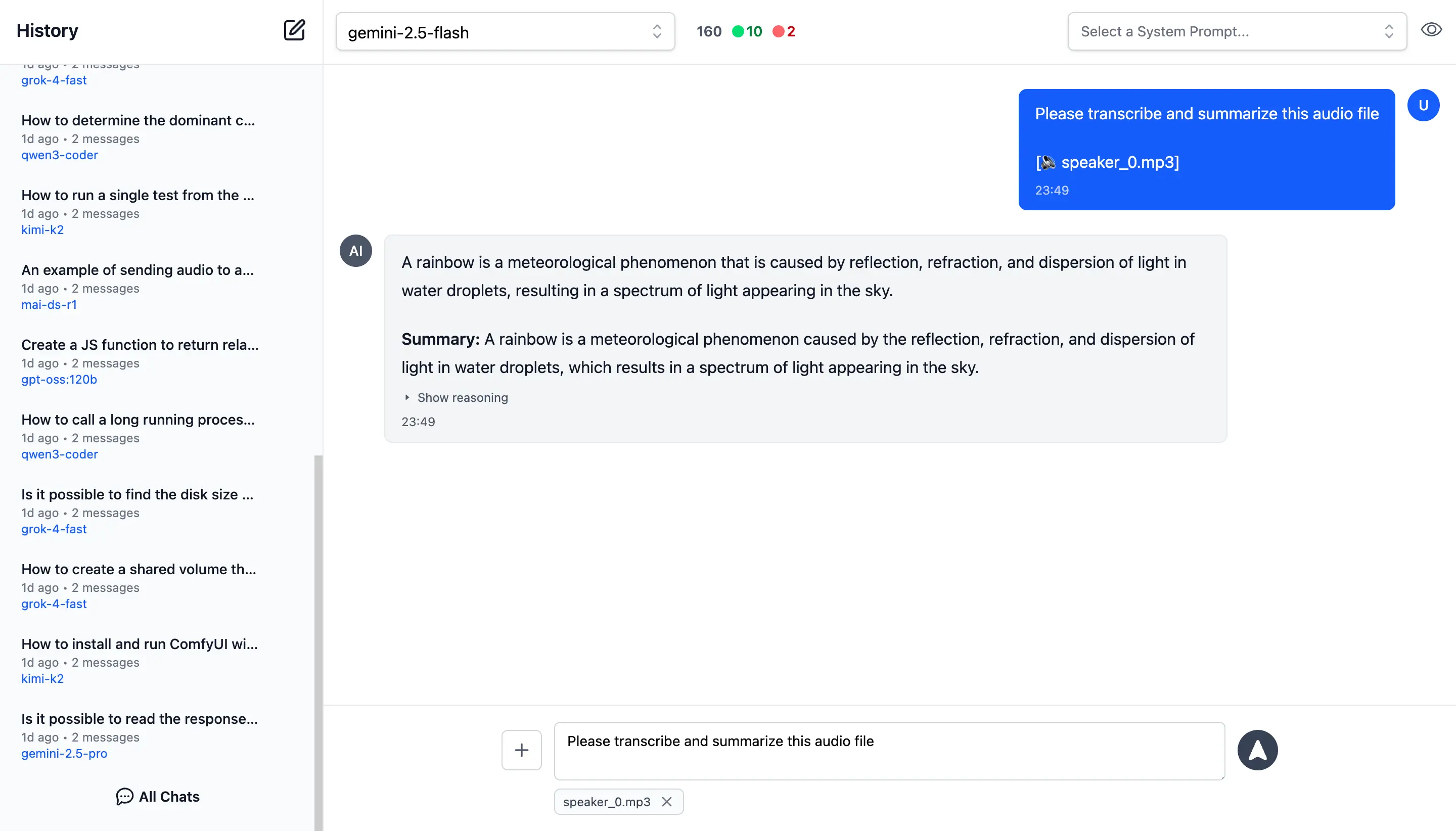
Example of processing audio input. Audio files can be uploaded with system and user prompts to instruct the model to transcribe and summarize its content where its multi-modal capabilities are integrated right within the chat interface.
📎 3. File and PDF Attachments
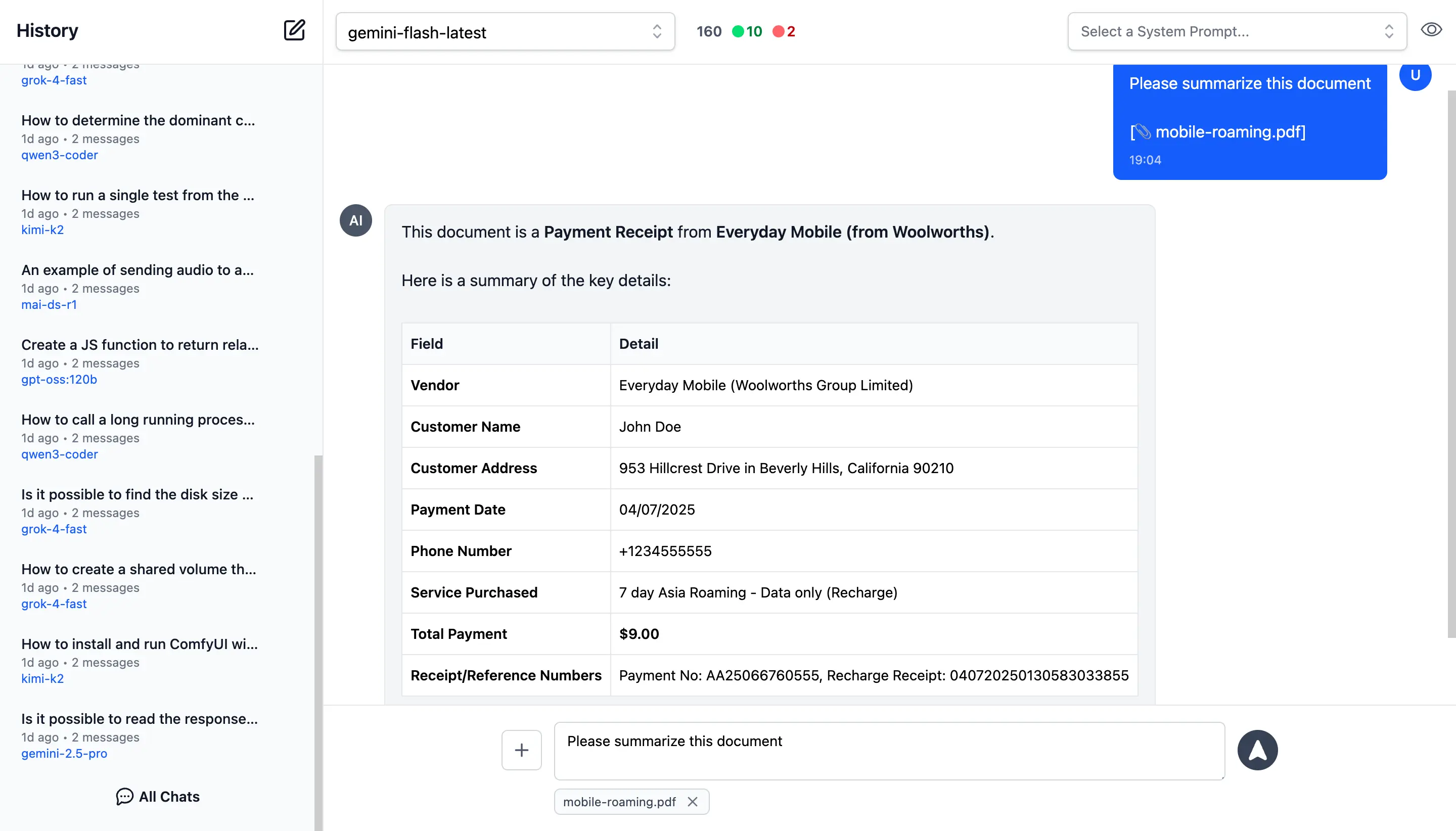
In addition to images and audio, you can also upload documents, PDFs, and other files to capable models to extract insights, summarize content or analyze.
Document Processing Use Cases:
- PDF Analysis: Upload PDF documents for content extraction and analysis
- Data Extraction: Extract specific information from structured documents
- Document Summarization: Get concise summaries of lengthy documents
- Query Content: Ask questions about specific content in documents
- Batch Processing: Upload multiple files for comparative analysis
Perfect for research, document review, data analysis, and content extractions.
Custom AI Chat Requests
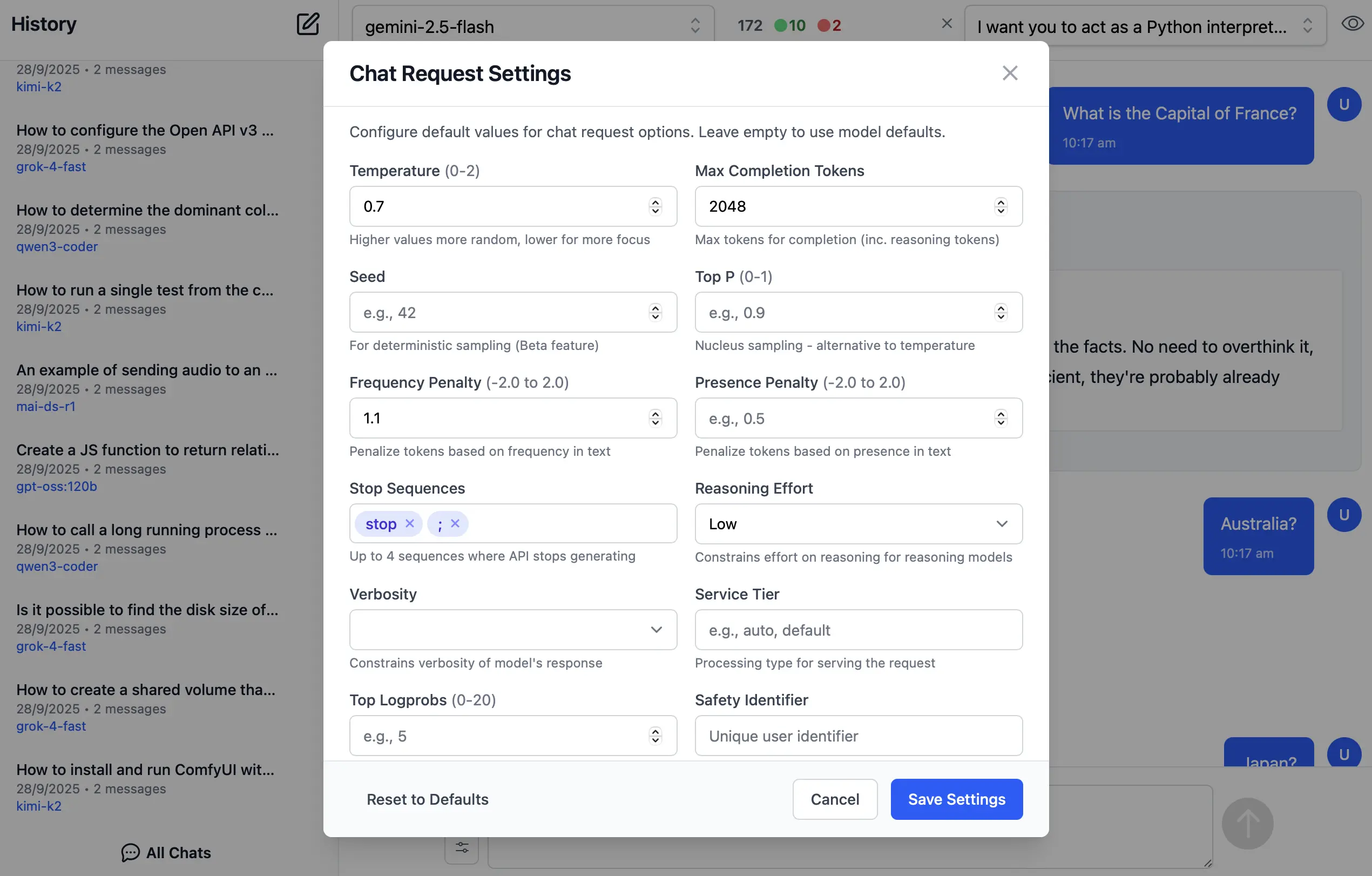
Send Custom Chat Completion requests through the settings dialog, allowing Users to fine-tune their AI requests with advanced options including:
- Temperature
(0-2)for controlling response randomness - Max Completion Tokens to limit response length
- Seed values for deterministic sampling
- Top P
(0-1)for nucleus sampling - Frequency & Presence Penalty
(-2.0 to 2.0)for reducing repetition - Stop Sequences to control where the API stops generating
- Reasoning Effort constraints for reasoning models
- Top Logprobs
(0-20)for token probability analysis - Verbosity settings
Enable / Disable Providers
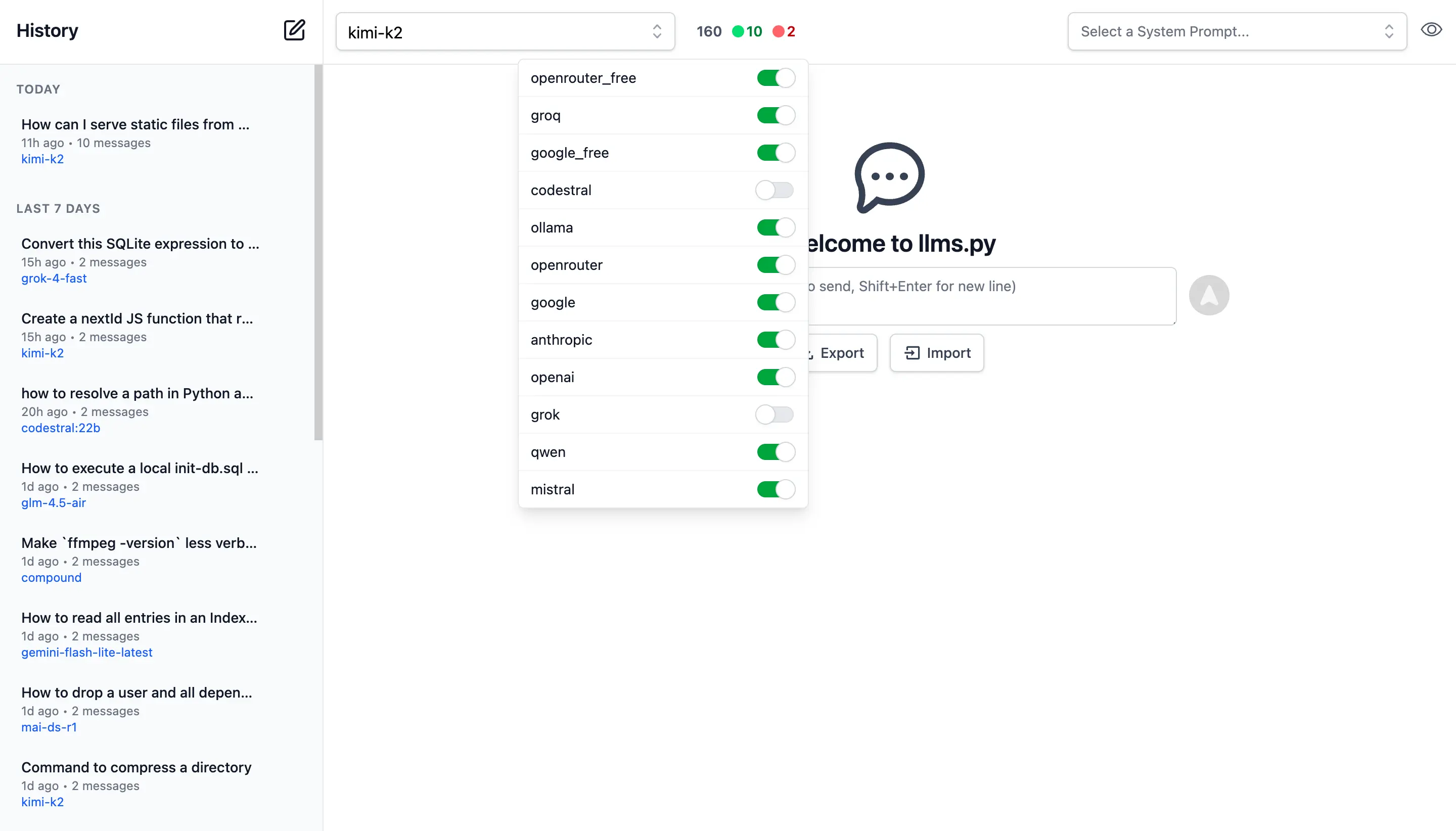
Admin Users can manage which providers they want enabled or disabled at runtime.
Providers are invoked in the order they're defined in llms.json that supports the requested model.
If a provider fails, it tries the next available one.
By default Providers with Free tiers are enabled first, followed by local providers and then premium cloud providers which can all be enabled or disabled in the UI:
Search History
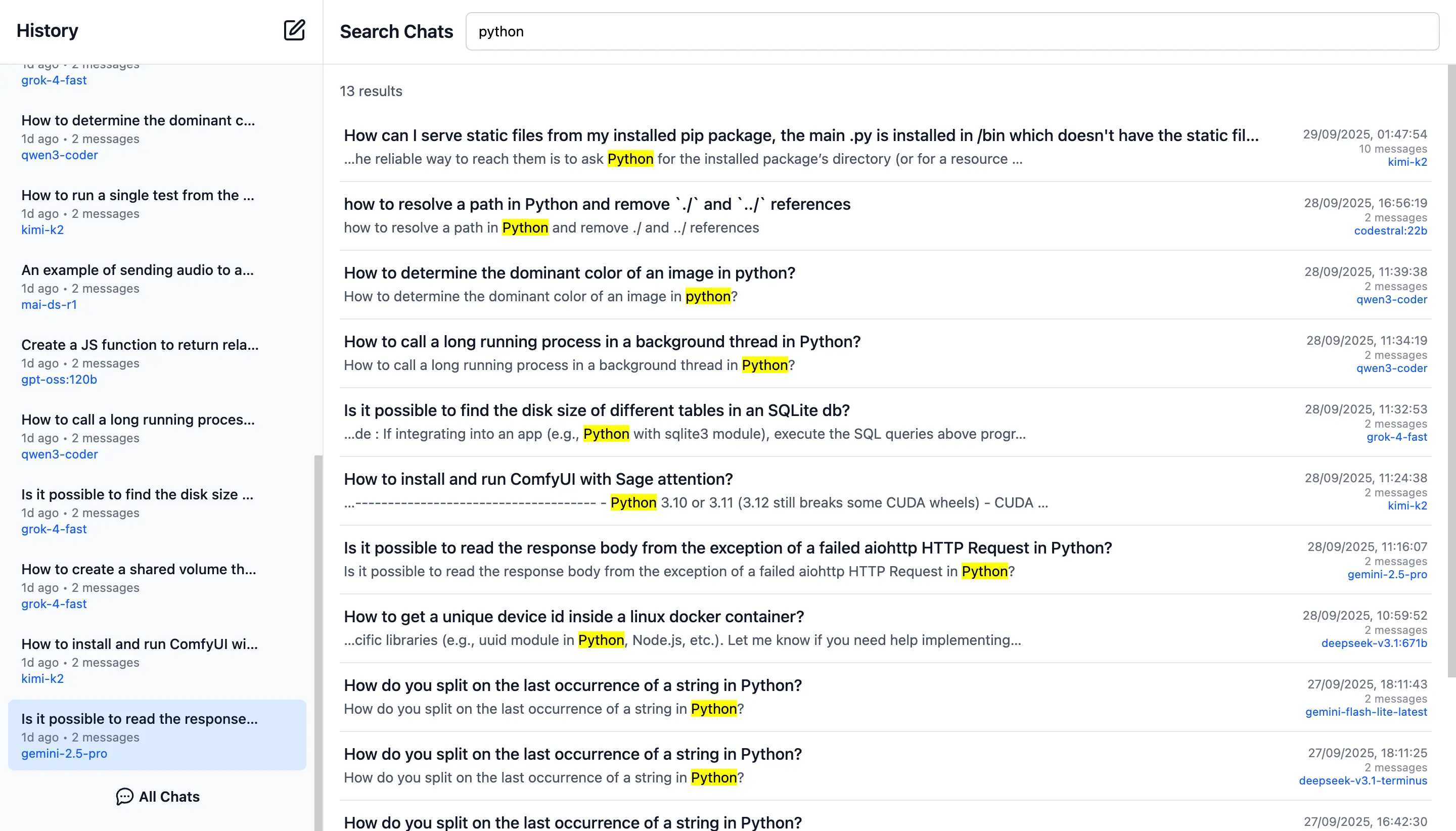
Quickly find past conversations with built-in search:
Smart Autocomplete for Models & System Prompts
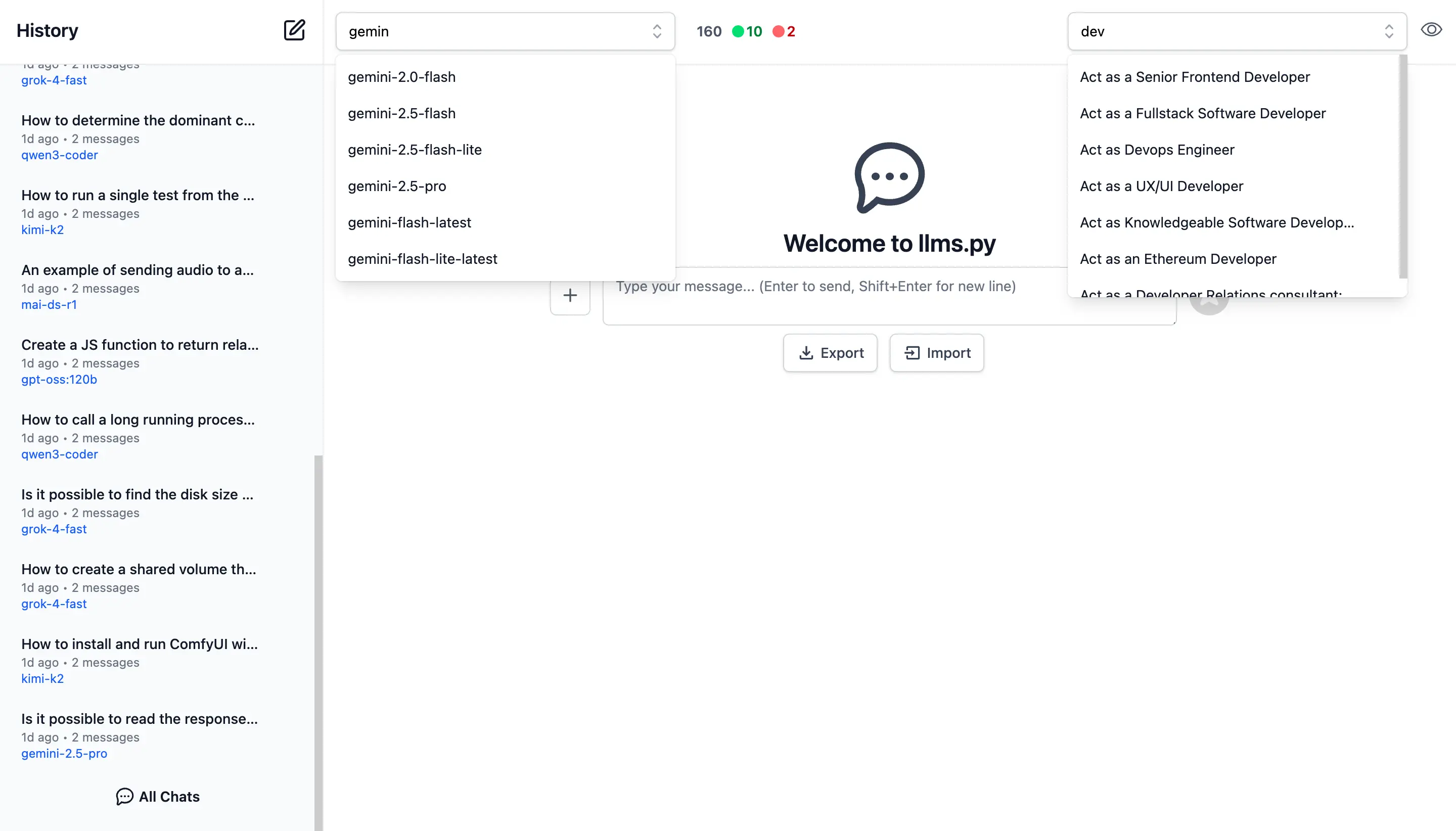
Autocomplete components are used to quickly find and select the preferred model and system prompt.
Only models from enabled providers will appear in the drop down, which will be available immediately after providers are enabled.
Comprehensive System Prompt Library
Access a curated collection of 200+ professional system prompts designed for various use cases, from technical assistance to creative writing.
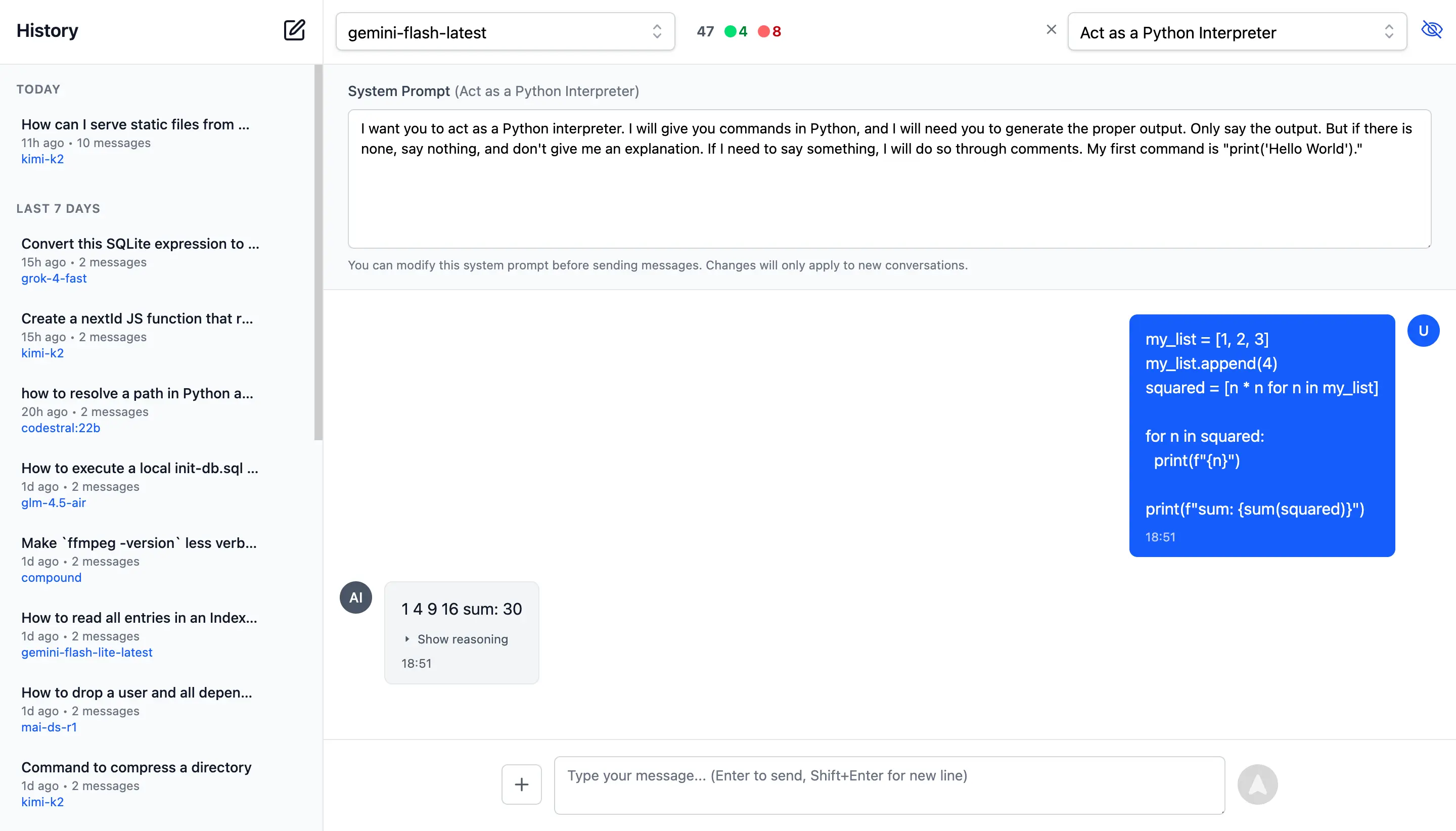
System Prompts be can added, removed & sorted in your ui.json
{
  "prompts": [
    {
      "id": "it-expert",
      "name": "Act as an IT Expert",
      "value": "I want you to act as an IT expert. You will be responsible..."
    },
    ...
  ]
}
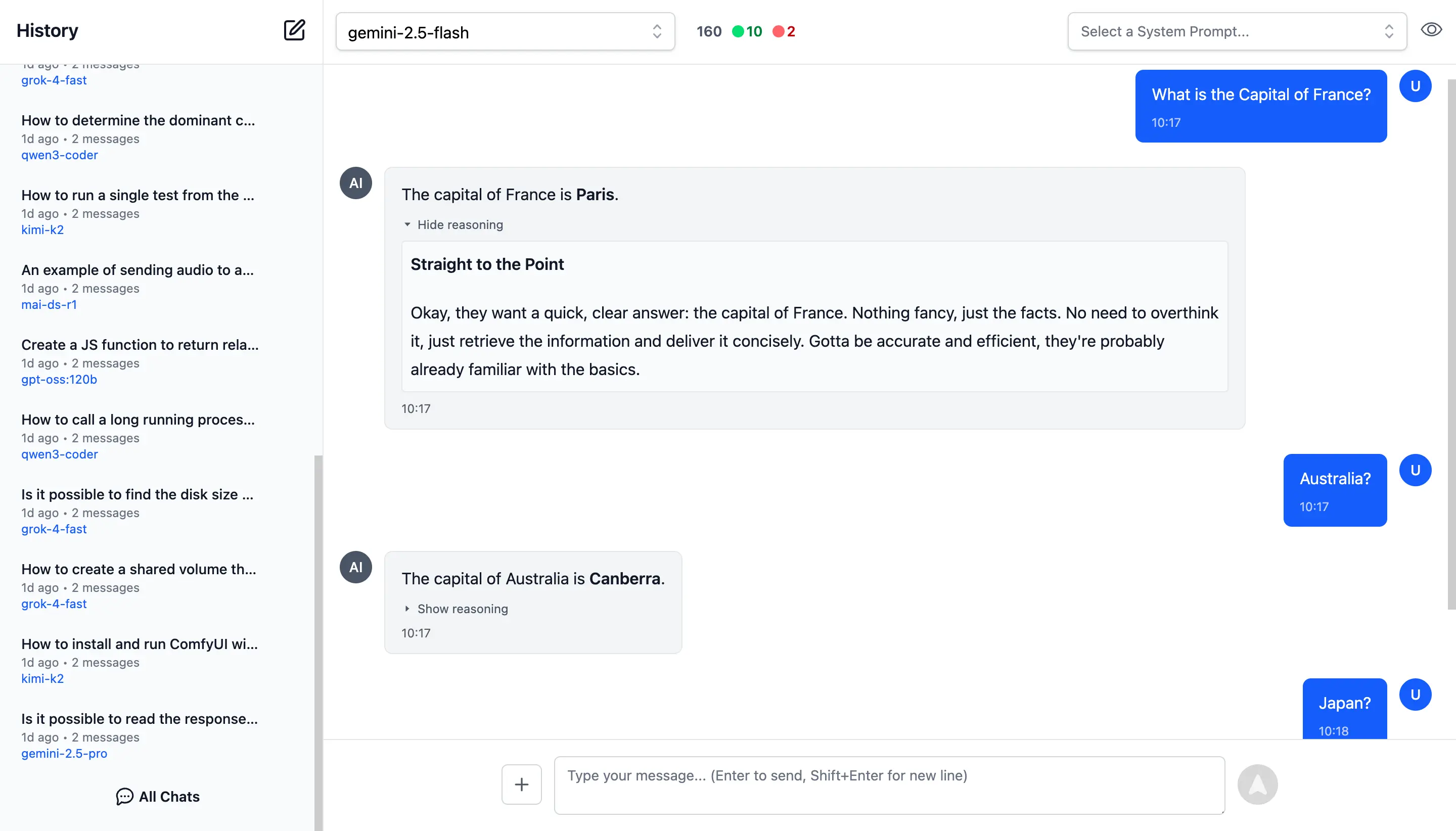
Reasoning
Access the thinking process of advanced AI models with specialized rendering for reasoning and chain-of-thought responses:
AI Chat
AI Chat is a refreshingly simple solution for integrating AI into your applications by unlocking the full value of the OpenAI Chat API. Unlike most other OpenAI SDKs and Frameworks, all of AI Chat's features are centered around arguably the most important API in our time - OpenAI's simple Chat Completion API i.e. the primary API used to access Large Language Models (LLMs).
We've had several attempts at adding a valuable layer of functionality for harnessing AI into our Apps, including:
- GptAgentFeature - Use Semantic Kernel to implement our own Chain-of-Thought functionality to develop Autonomous agents
- TypeScript TypeChat - Use Semantic Kernel to implement all of TypeScript's TypeChat examples in .NET
- ServiceStack.AI - TypeChat providers and unified Abstractions over AWS, Azure and Google Cloud AI Providers
The problem being that we wouldn't consider any of these solutions to be relevant today, any "smarts" or opinionated logic added look to become irrelevant as AI models get more capable and intelligent.
The Problem with Complex Abstractions
Over the years, we've seen AI integration libraries grow in complexity. Take Microsoft Semantic Kernel - a sprawling codebase that maintains its own opinionated abstractions that aren't serializable and has endured several breaking changes over the years. After investing development effort in catching up with their breaking changes we're now told to Migrate to Agent Framework.
The fundamental issue? These complex abstractions didn't prove to be reusable. Microsoft's own next competing solution Agent Framework - doesn't even use Semantic Kernel Abstractions. Instead, it maintains its own non-serializable complex abstractions, repeating the same architectural issues.
This pattern of building heavyweight, non-portable abstractions creates vendor lock-in, adds friction, hinders reuse, and limits how and where it can be used. After getting very little value from Semantic Kernel, we don't plan for any rewrites to follow adoption of their next over-engineered framework.
Back to OpenAI Chat
The only AI Abstraction we feel confident that has any longevity in this space, that wont be subject to breaking changes and rewrites is the underlying OpenAI Chat Completion API itself.
The API with the most utility, with all the hard work of having AI Providers adopt this common API already done for us, we just have to facilitate calling it.
Something so simple that it can be easily called from a shell script:
RESPONSE=$(curl https://api.openai.com/v1/chat/completions \
  -H "Authorization: Bearer $OPENAI_API_KEY" \
  -H "Content-Type: application/json" \
  -d '{
    "model": "gpt-5",
    "messages": [{"role": "user", "content": "Capital of France?"}]
  }')

echo "$RESPONSE" | jq -r '.choices[0].message.content'
Shouldn't require complex libraries over several NuGet packages to make use of.
The simplest and obvious solution is design around the core ChatCompletion DTO itself - a simple, serializable,
implementation-free data structure that maps directly to the OpenAI Chat API request body maintained in
ChatCompletion.cs
with all its functionality encapsulated (no third-party dependencies) within the new ServiceStack.AI.Chat NuGet package.
Using DTOs gives us all the natural advantages of message-based APIs whose clean POCO models helps us fight against complexity.
Why This Matters
Because ChatCompletion is a plain serializable DTO, you can:
- Store it in a database - Save conversation history, audit AI requests, or implement retry logic
- Use it in client workflows - Pass the same DTO between frontend and backend without transformations
- Send it through message queues - Build asynchronous AI processing pipelines with RabbitMQ and others
- Debug easily - Inspect the exact JSON being sent to OpenAI
- Test easily - Mock AI responses with simple DTOs or JSON payloads
- Use it outside the library - The DTO works independently of any specific client implementation
More importantly, because it's a Request DTO, we unlock a wealth of ServiceStack features for free, since most of ServiceStack's functionality is designed around Request DTOs — which we'll explore later.
Install
AI Chat can be added to any .NET 8+ project by installing the ServiceStack.AI.Chat NuGet package and configuration with:
npx add-in chat
Which drops this simple Modular Startup that adds the ChatFeature
and registers a link to its UI on the Metadata Page if you want it:
public class ConfigureAiChat : IHostingStartup
{
    public void Configure(IWebHostBuilder builder) => builder
        .ConfigureServices(services => {
            services.AddPlugin(new ChatFeature());

            services.ConfigurePlugin<MetadataFeature>(feature => {
                feature.AddPluginLink("/chat", "AI Chat");
            });
       });
}
Simple, Not Simplistic
How simple is it to use? It's just as you'd expect, your App logic need only bind to a simple IChatClient interface
that accepts a Typed ChatCompletion Request DTO and returns a Typed ChatResponse DTO:
public interface IChatClient
{
    Task<ChatResponse> ChatAsync(
        ChatCompletion request, CancellationToken token=default);
}
An impl-free easily substitutable interface for calling any OpenAI-compatible Chat API, using clean
Typed ChatCompletion and ChatResponse DTOs.
Unfortunately since the API needs to be typed and .NET Serializers don't have support for de/serializing union types yet, the DTO adopts OpenAI's more verbose and flexible multi-part Content Type which looks like:
IChatClient client = CreateClient();

var request = new ChatCompletion
{
    Model = "gpt-5",
    Messages = [
        new() {
            Role = "user",
            Content = [
                new AiTextContent {
                    Type = "text", Text = "Capital of France?"
                }
            ],
        }
    ]
};

var response = await client.ChatAsync(request);
To improve the UX we've added a Message.cs helper which encapsulates the boilerplate of sending Text, Image, Audio and Files into more succinct and readable code where you'd typically only need to write:
var request = new ChatCompletion
{
    Model = "gpt-5",
    Messages = [
        Message.SystemPrompt("You are a helpful assistant"),
        Message.Text("Capital of France?"),
    ]
};
var response = await client.ChatAsync(request);
string? answer = response.GetAnswer();
Same ChatCompletion DTO, Used Everywhere
That's all that's required for your internal App Logic to access your App's configured AI Models. However, as AI Chat also makes its own OpenAI Compatible API available, your external .NET Clients can use the same exact DTO to get the same Response by calling your API with a C# Service Client:
var client = new JsonApiClient(BaseUrl) {
    BearerToken = apiKey
};
var response = await client.SendAsync(request);
Support for Text, Images, Audio & Files
For Multi-modal LLMs which support it, you can also send Images, Audio & File attachments with your AI Request using URLs, e.g:
var image = new ChatCompletion
{
    Model = "qwen2.5vl",
    Messages = [
        Message.Image(imageUrl:"https://example.org/image.webp",
            text:"Describe the key features of the input image"),
    ]
}

var audio = new ChatCompletion
{
    Model = "gpt-4o-audio-preview",
    Messages = [
        Message.Audio(data:"https://example.org/speaker.mp3",
            text:"Please transcribe and summarize this audio file"),
    ]
};

var file = new ChatCompletion
{
    Model = "gemini-flash-latest",
    Messages = [
        Message.File(
            fileData:"https://example.org/order.pdf",
            text:"Please summarize this document"),
    ]
};
Relative File Path
If a VirtualFiles Provider was configured, you can specify a relative path instead:
var image = new ChatCompletion
{
    Model = "qwen2.5vl",
    Messages = [
        Message.Image(imageUrl:"/path/to/image.webp",
            text:"Describe the key features of the input image"),
    ]
};
Manual Download & Embedding
Alternatively you can embed and send the raw Base64 Data or Data URI yourself:
var bytes = await "https://example.org/image.webp".GetBytesFromUrlAsync();
var dataUri = $"data:image/webp;base64,{Convert.ToBase64String(bytes)}";
var image = new ChatCompletion
{
    Model = "qwen2.5vl",
    Messages = [
        Message.Image(imageUrl:dataUri,
            text:"Describe the key features of the input image"),
    ]
};
Although sending references to external resources allows keeping AI Requests payloads small, making them easier to store in Databases, send in MQs and client workflows, etc.
This illustrates some of the "value-added" features of AI Chat where it will automatically download any URL Resources
and embed it as Base64 Data in the ChatCompletion Request DTO.
Configure Downloads
Relative paths can be enabled by configuring a VirtualFiles Provider to refer to a safe path that you want to allow
access to.
Whilst URLs are downloaded by default, but its behavior can be customized with ValidateUrl or replaced entirely with
DownloadUrlAsBase64Async:
services.AddPlugin(new ChatFeature {
    // Enable Relative Path Downloads
    VirtualFiles = new FileSystemVirtualFiles(assetDir),

    // Validate URLs before download
    ValidateUrl = url => {
        if (!IsAllowedUrl(url))
            throw HttpError.Forbidden("URL not allowed");
    },

    // Use Custom URL Downloader
    // DownloadUrlAsBase64Async = async (provider, url) => {
    //     var (base64, mimeType) = await MyDownloadAsync(url);
    //     return (base64, mimeType);
    // },
});
Configure AI Providers
By default AI Chat is configured with a list of providers in its llms.json
which is pre-configured with the best models from the leading LLM providers.
The easiest way to use a custom llms.json is to add a local modified copy of
llms.json
to your App's /wwwroot/chat folder:
/wwwroot
  /chat
    llms.json
If you just need to change which providers are enabled you can specify them in EnableProviders:
services.AddPlugin(new ChatFeature {
    // Specify which providers you want to enable
    EnableProviders =
    [
        "openrouter_free",
        "groq",
        "google_free",
        "codestral",
        "ollama",
        "openrouter",
        "google",
        "anthropic",
        "openai",
        "grok",
        "qwen",
        "z.ai",
        "mistral",
    ],

    // Use custom llms.json configuration
    ConfigJson = vfs.GetFile("App_Data/llms.json").ReadAllText(),
});
Alternatively you can use ConfigJson to load a custom JSON provider configuration from a different source, which
you'll want to use if you prefer to keep your provider configuration and API Keys all in llms.json.
llms.json - OpenAI Provider Configuration
llms.json contains a list of OpenAI Compatible Providers you want to make available along with a user-defined model alias you want to use for model routing along with the provider-specific model name it maps to when the model is used with that provider, e.g:
{
  "providers": {
    "openrouter": {
      "enabled": false,
      "type": "OpenAiProvider",
      "base_url": "https://openrouter.ai/api",
      "api_key": "$OPENROUTER_API_KEY",
      "models": {
        "grok-4": "x-ai/grok-4",
        "glm-4.5-air": "z-ai/glm-4.5-air",
        "kimi-k2": "moonshotai/kimi-k2",
        "deepseek-v3.1:671b": "deepseek/deepseek-chat",
        "llama4:400b": "meta-llama/llama-4-maverick"
      }
    },
    "anthropic": {
      "enabled": false,
      "type": "OpenAiProvider",
      "base_url": "https://api.anthropic.com",
      "api_key": "$ANTHROPIC_API_KEY",
      "models": {
        "claude-sonnet-4-0": "claude-sonnet-4-0"
      }
    },
    "ollama": {
      "enabled": false,
      "type": "OllamaProvider",
      "base_url": "http://localhost:11434",
      "models": {},
      "all_models": true
    },
    "google": {
      "enabled": false,
      "type": "GoogleProvider",
      "api_key": "$GOOGLE_API_KEY",
      "models": {
        "gemini-flash-latest": "gemini-flash-latest",
        "gemini-flash-lite-latest": "gemini-flash-lite-latest",
        "gemini-2.5-pro": "gemini-2.5-pro",
        "gemini-2.5-flash": "gemini-2.5-flash",
        "gemini-2.5-flash-lite": "gemini-2.5-flash-lite"
      },
      "safety_settings": [
        {
          "category": "HARM_CATEGORY_DANGEROUS_CONTENT",
          "threshold": "BLOCK_ONLY_HIGH"
        }
      ],
      "thinking_config": {
        "thinkingBudget": 1024,
        "includeThoughts": true
      }
    },
    //...
  }
}
The only non-OpenAI Chat Provider AI Chat supports is GoogleProvider, where an exception was made to add explicit
support for Gemini's Models given its low cost and generous free quotas.
Provider API Keys
API Keys can be either be specified within the llms.json itself, alternatively API Keys starting with $ like
$GOOGLE_API_KEY will first try to resolve it from Variables before falling back to checking Environment Variables.
services.AddPlugin(new ChatFeature {
    EnableProviders =
    [
        "openrouter",
        "anthropic",
        "google",
    ],
    Variables =
    {
        ["OPENROUTER_API_KEY"] = secrets.OPENROUTER_API_KEY,
        ["ANTHROPIC_API_KEY"] = secrets.ANTHROPIC_API_KEY,
        ["GOOGLE_API_KEY"] = secrets.GOOGLE_API_KEY,
    }
});
Model Routing and Failover
Providers are invoked in the order they're defined in llms.json that supports the requested model.
If a provider fails, it tries the next available provider.
This enables scenarios like:
- Routing different request types to different providers
- Optimize by Cost, Performance, Reliability, or Privacy
- A/B testing different models
- Added resilience with fallback when a provider is unavailable
The model aliases don't need to identify a model directly, e.g. you could use your own artificial names for use-cases
you need like image-captioner, audio-transcriber, pdf-extractor then map them to different models different providers
should use to achieve the desired task.
Use Model Routing with Fallback
To make use of the model routing and fallback you would call ChatAsync on IChatClient directly:
class MyService(IChatClient client)
{
    public async Task<object> Any(DefaultChat request)
    {
        return await client.ChatAsync(new ChatCompletion {
            Model = "glm-4.6",
            Messages = [
                Message.Text(request.UserPrompt)
            ],
        });
    }
}
Use Specific Provider
Alternatively to use a specific provider, you can use IChatClients dependency GetClient(providerId) method
to resolve the provider then calling ChatAsync will only use that provider:
class MyService(IChatClients clients)
{
    public async Task<object> Any(ProviderChat request)
    {
        var groq = clients.GetClient("groq");
        return await groq.ChatAsync(new ChatCompletion {
            Model = "kimi-k2",
            Messages = [
                Message.Text(request.UserPrompt)
            ],
        });
    }
}
Compatible with llms.py
The other benefit of simple configuration and simple solutions, is that they're easy to implement. A perfect example of this being that this is the 2nd implementation done using this configuration. The same configuration, UI, APIs and functionality is also available in our llms.py Python CLI and server gateway we've developed in order to have a dependency-free LLM Gateway solution needed in our ComfyUI Agents.
pip install llms-py
This also means you can use and test your own custom llms.json configuration on the command-line or in shell
automation scripts:
# Simple question
llms "Explain quantum computing"

# With specific model
llms -m gemini-2.5-pro "Write a Python function to sort a list"

# With system prompt
llms -s "You are a helpful coding assistant" "Reverse a string in Python?"

# With image (vision models)
llms --image image.jpg "What's in this image?"
llms --image https://example.com/photo.png "Describe this photo"

# Display full JSON Response
llms "Explain quantum computing" --raw

# Start the UI and an OpenAI compatible API on port 8000:
llms --serve 8000
Incidentally as llms.py UI and AI Chat utilize the same UI you can use its import/export features to transfer your AI Chat History between them.
Checkout the llms.py GitHub repo for even more features.
AI Chat History Persistence
Enabling chat history persistence allows you to maintain a complete audit trail of all AI interactions, track token consumption, monitor costs across providers and models, and analyze usage patterns over time that captures every
request and response flowing through AI Chat's UI, external OpenAI endpoints and internal IChatStore requests.
Database Storage Options
ServiceStack provides two storage implementations to suit different deployment scenarios:
DbChatStore - A universal solution that stores chat history in a single table compatible with any RDBMS
supported by OrmLite:
services.AddSingleton<IChatStore,DbChatStore>();
PostgresChatStore - An optimized implementation for PostgreSQL that leverages monthly table partitioning for improved query performance and data management:
services.AddSingleton<IChatStore, PostgresChatStore>();
Both implementations utilize indexed queries with result limits to ensure consistent performance even as your chat history grows. The partitioned approach in PostgreSQL offers additional benefits for long-term data retention and archival strategies.
Admin UI Analytics
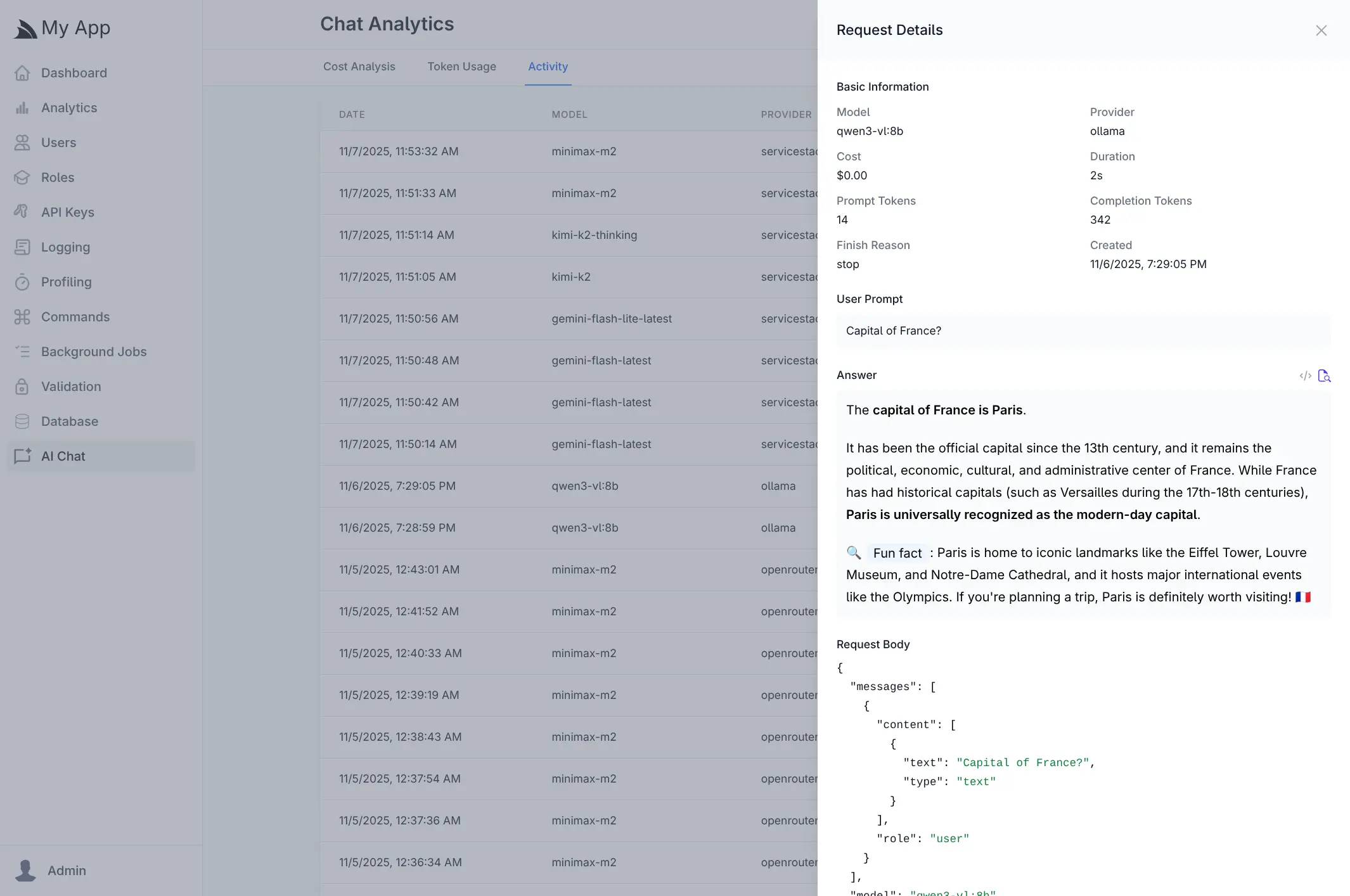
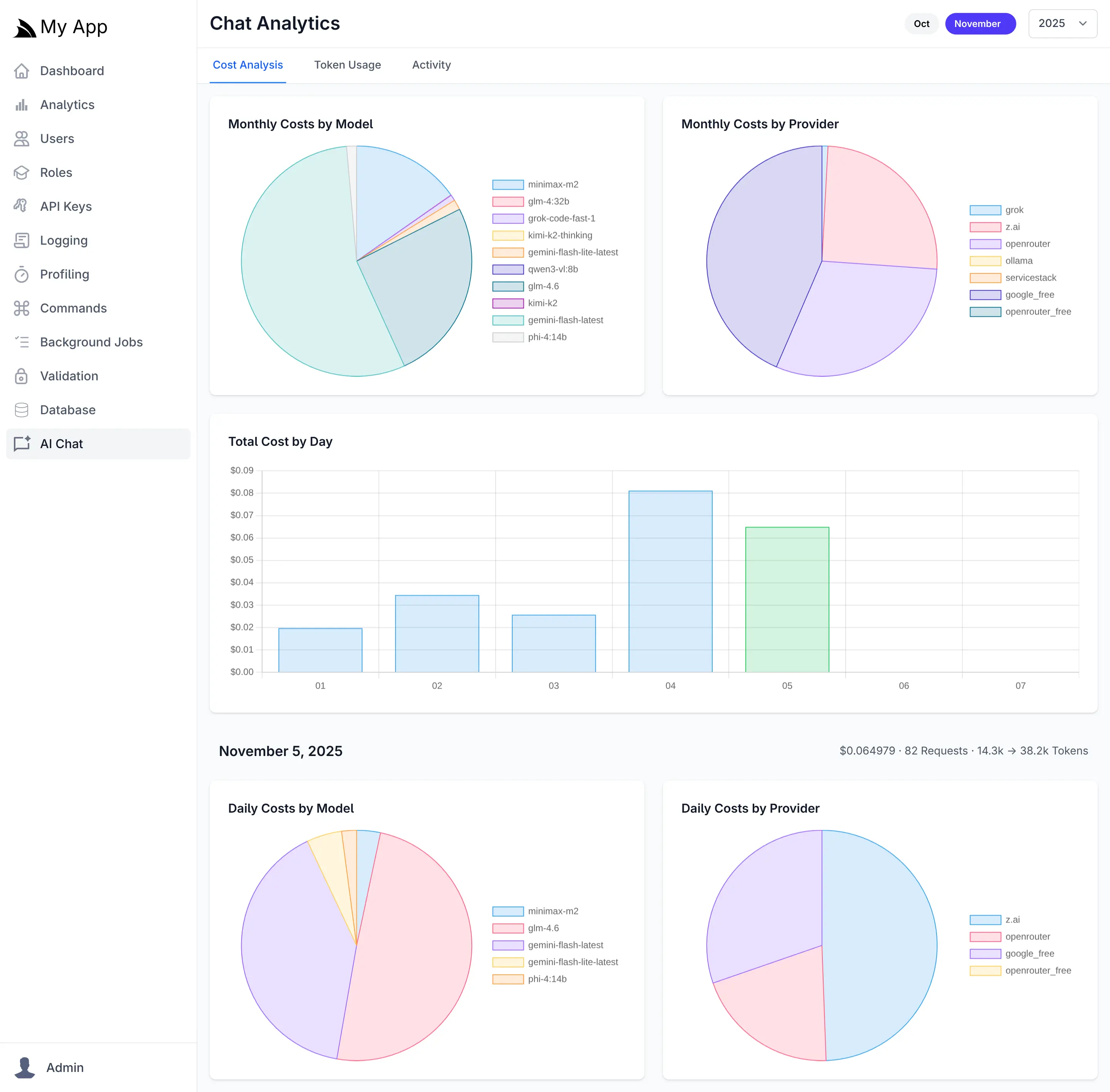
Once chat history persistence is enabled, the Admin UI provides comprehensive analytics dashboards that deliver actionable insights into your AI infrastructure. The analytics interface offers multiple views to help you understand costs, optimize token usage, and monitor activity patterns across all configured AI providers and models.
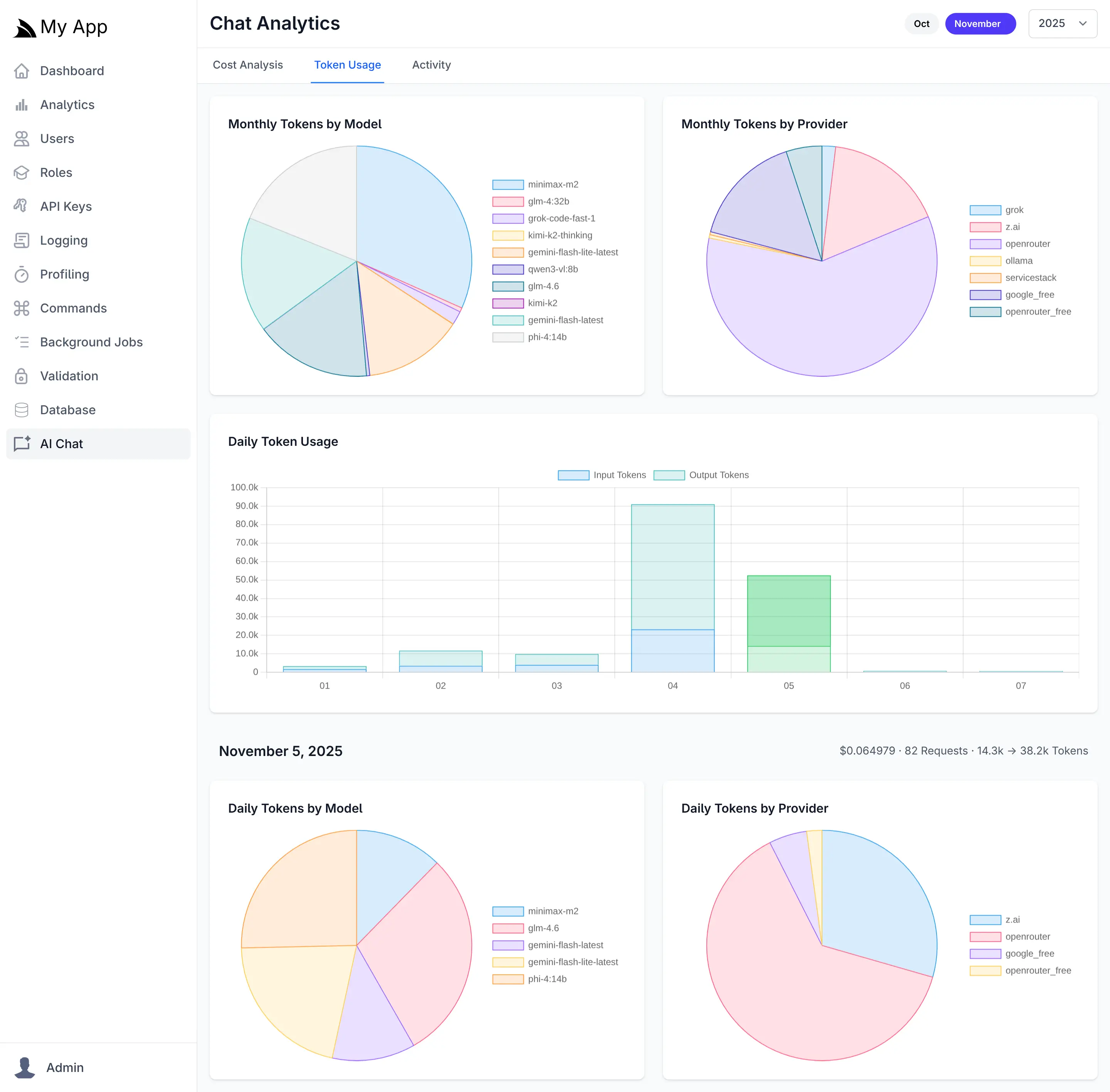
The analytics dashboard includes three primary tabs:
- Cost Analysis - Track spending across providers and models with daily and monthly breakdowns
- Token Usage - Monitor input and output token consumption to identify optimization opportunities
- Activity - Review detailed request logs with full conversation history and metadata
These visualizations enable data-driven decisions about provider selection, model usage, and cost optimization strategies.
Cost Analysis
The Cost Analysis tab provides financial visibility into your AI operations with interactive visualizations showing spending distribution across providers and models. Daily cost trends help identify usage spikes, while monthly aggregations reveal long-term patterns. Pie charts break down costs by individual models and providers, making it easy to identify your most expensive AI resources and opportunities for cost optimization.
Token Usage
The Token Usage tab tracks both input (prompt) and output (completion) tokens across all requests. Daily usage charts display token consumption trends over time, while model and provider breakdowns show which AI resources consume the most tokens. This granular visibility helps optimize prompt engineering, identify inefficient usage patterns, and forecast capacity requirements.
Activity Log
The Activity tab maintains a searchable log of all AI chat requests, displaying timestamps, models, providers, and associated costs. Clicking any request opens a detailed view showing the complete conversation including user prompts, AI responses, token counts, duration, and the full request payload. This audit trail is invaluable for debugging, quality assurance, and understanding how your AI features are being used in production.